Dear Valued Clients,
Synergix Team trusts your organisation is keeping well under a challenging business landscape and we also hope that our Synergix ERP software has assisted your business in running smoothly and remaining productive.
With the goal of continually pursuing innovation and improving usability, we would like to bring to your attention our new features, enhancements in this month’s newsletter. Thank you for your kind and continued trust towards Synergix Technologies.
PROJECT & CONTRACT
1. SBU Security Control at Service Enquiry Call Screen (FC: 8678)
In Synergix ERP system, the purpose of Service Enquiry Call screen is to enable users tag each enquiry call to an active Project Order (PO). Previously, ERP software users have to enter the SBU from PO screen. Now, when users tag an enquiry call to an active PO, the system will automatically default the SBU from PO to the enquiry call, and display the SBU at Service Enquiry Call screen.
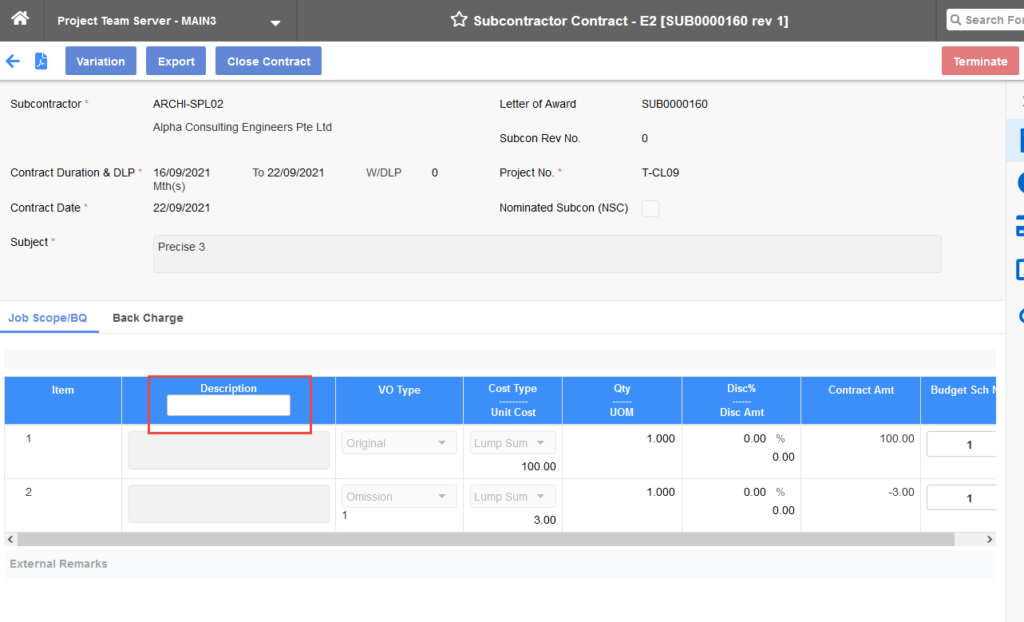
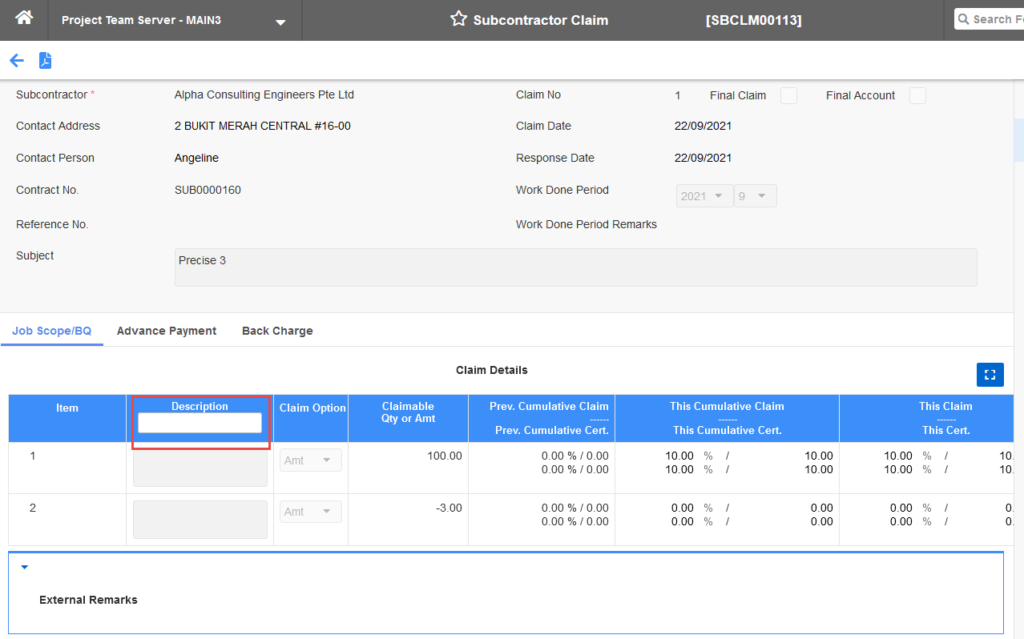
2. Filter in Description Column of Job Scope/Budget Quotation (BQ) in Subcon Contract and Subcon Claim Screens (FC: E1-TH6_PJ_SUBCON_CONTRACT_E2, E1-TH6_PJ_SUBCON_CLAIM_E2)
In Synergix ERP system, there might be many items in the job scope and item lists in Subcon Contract and Subcon Claim screens. Synergix Technologies has added a filter in Description column of the Job Scope/Budget Quotation table. ERP software users can do filtering based on the item description that users had put in before. This modification enables users to search for an item faster with a searching function using item pertaining and specific descriptions. Now, users do not have to scroll through the whole item list to look for a specific one, thereby saving time.
To enables these screens, ERP system users can access as following:
- Subcon Contract screen: Operations > Project > Subcon Contract > Contract > Subcontract Contract – E2.
- Subcon Claim screen: Operations > Project > Subcon Contract > Billing > Subcontract Claim – Standard V1.
3. New Panel Tab for Document Numbering Scheme (DNS) selection in E2 Project Claim and Subcon Claim Screens (FC: TH6_PJ_SUBCON_CLAIM_V1, TH6_PROJECT_CLAIM_E2)
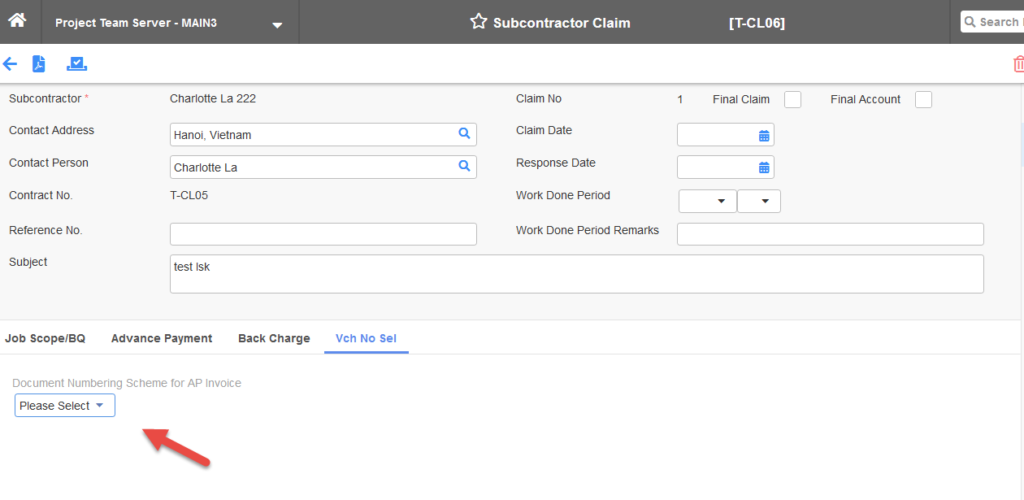
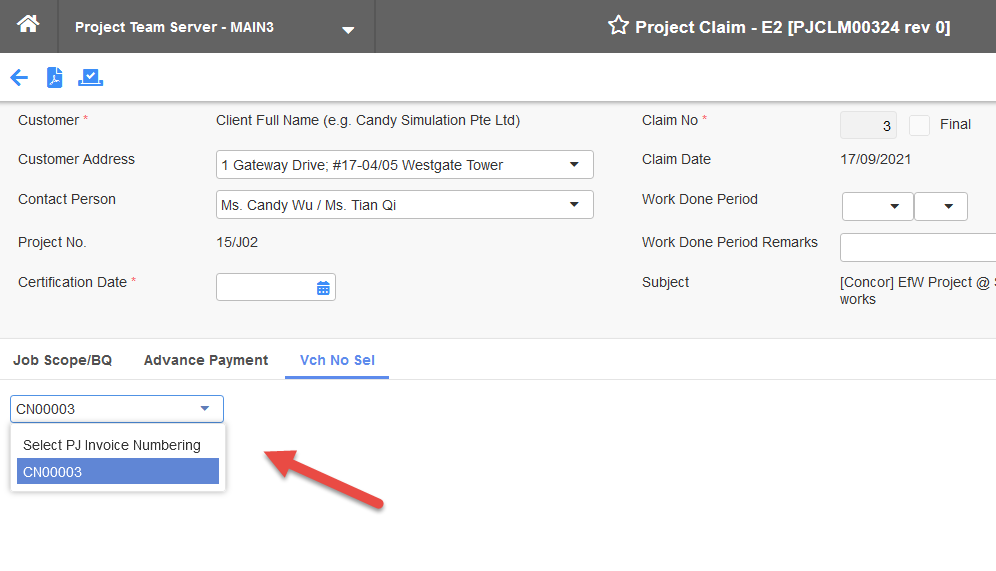
DNS is the code that is attached to invoice generated when ERP software users submit claims. Previously, DNS selection in Project Claim and Subcon Claim screens is on the first highest taskbar, allowing users to select project invoice number.
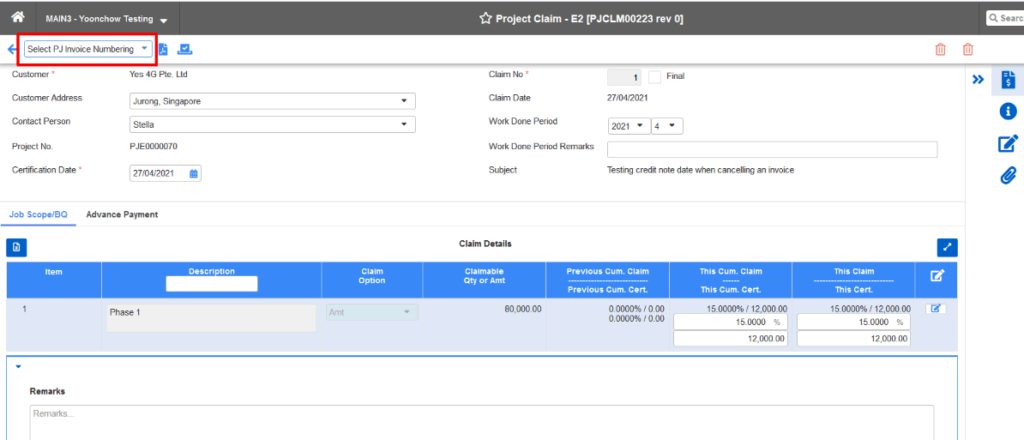
For better usability, we have worked on UI enhancement in these screens by removing old selection field and generating a new Voucher Number Selection tab for DNS selection. This can save users from the scrolling to check on the information.
4. Permission Form Code and UI Enhancement for Operational Asset Request Screen (FC: TH6_OA_REQUEST)
The purpose of this enhancement is to allow project team members to raise request of operational asset for project usage and subsequently asset manager can perform scheduling for each of the Operational Asset (OA) request raised.
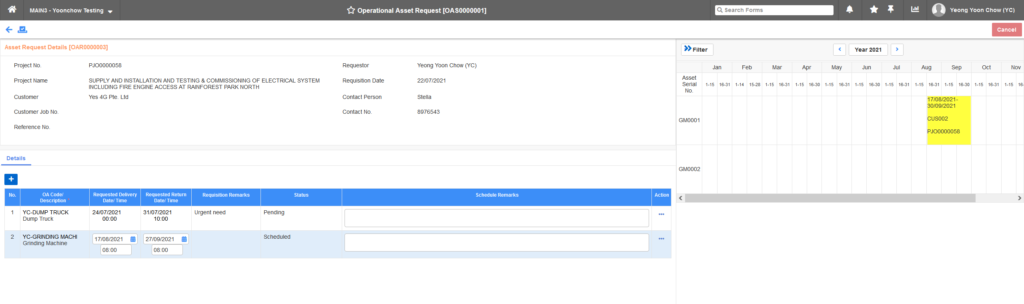
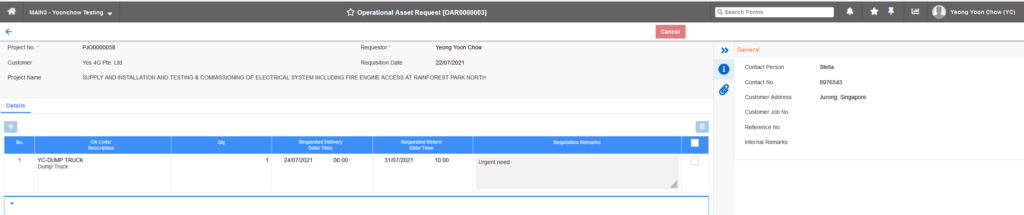
During OA scheduling, asset manager is able to view the availability of the operational asset in a calendar view and subsequently assign the available asset serial number. The authority to raise OA request and perform OA scheduling is controlled by Permission Form Code.
5. “Line Item Remarks” field – UI Enhancement for PMR, PRS, PO, GRN, SI Screens (FC: TH6_PU_PROJECT_MATERIAL_REQUEST_BY_BGT_SCH_V1, TH6_PU_SOURCING_BY_BGT_SCH_V1, TH6_PU_ORDER_BY_BGT_SCH_V1, TH6_GOODS_RECEIVING_BY_BGT_SCH_V1, TH6_STOCK_ISSUE_PROJECT_MULTI_PMR)
For convenience in adding remark for item, we have improved UI in Project Material Request (PMR), Purchase Requisition Sourcing (PRS), Purchase Order (PO), Good Receiving (GRN), Stock Issue (SI) screens. The line “Item Remark” is added under the “Item Code / Description”. Kindly noted that the line will show only when the item has specific remarks. If not, it will be automatically hidden.
To reach above screens, kindly access as following:
- PMR: Operations > SCM > Purchase > Requisition > Project Material Request – Budget V1
- PRS: Operations > SCM > Purchase > Requisition > Purchase Requisition – Sourcing – Budget V1
- PO: Operations > SCM > Purchase > Order > Purchase Order – Budget V1
- GRN: Operations > SCM > Logistics > Incoming > Good Receiving – Budget V1
- SI: Operations > SCM > Logistics > Delivery > Stock Issue (Project) – Multiple PMR
PAYROLL & FINANCE
1. General Ledger – Journal Enquiry Enhancement (FC: 6077)
Journal History Enquiry screen in Synergix ERP software is to allow users to view how a General Ledger Account Number (GLAN) is posted into general ledger. The enhancement enables users to search a GLAN by filtering financial year/period and voucher date.
- When ERP software users choose to search by financial year/period, the system will show balance summary of the GLAN which has the general ledger transitions in the chosen period. Kindly noted that the currency code should be from AUD to SGD.
- If ERP software users choose upon voucher date, the system will show transaction details which include modules, transaction types, voucher number/date, currency and amount during the chosen period. The balance summary table will not be shown when users filter by voucher date.
Afterwards, the transaction detail box will pop up, and users are able to do sorting and filtering to search for needed information. To access the screen, users can entry by Enquiry > General Ledger > Journal History.
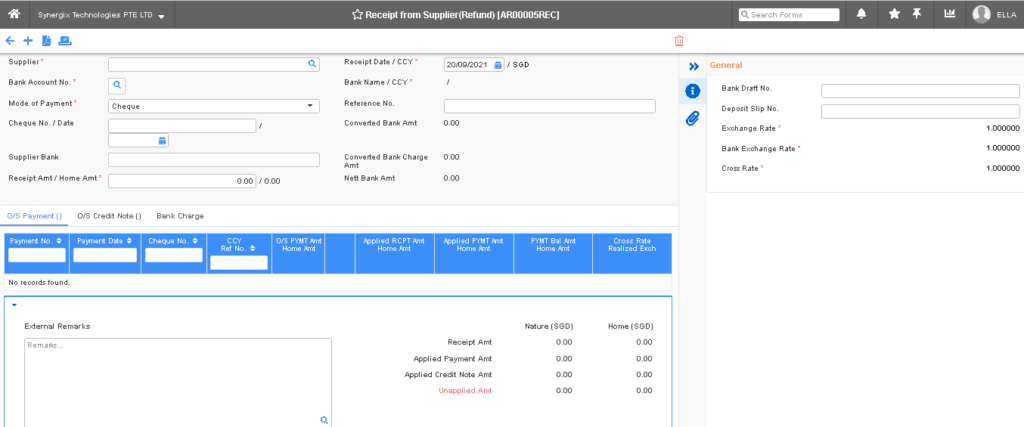
2. E2 Receipt from Supplier (Refund) (FC: TH6_AR_RECEIPT_REFUND_V1)
The E2 Receipt from Supplier (Refund) screen is used to show receipt summary. Now, the screen comes with new UI enhancement and includes two new tabs Draft Summary and History Summary. File attachment button is also added in for uploading documents.

Upon clicking on the current Receipt number, the system will show details of the voucher accordingly.
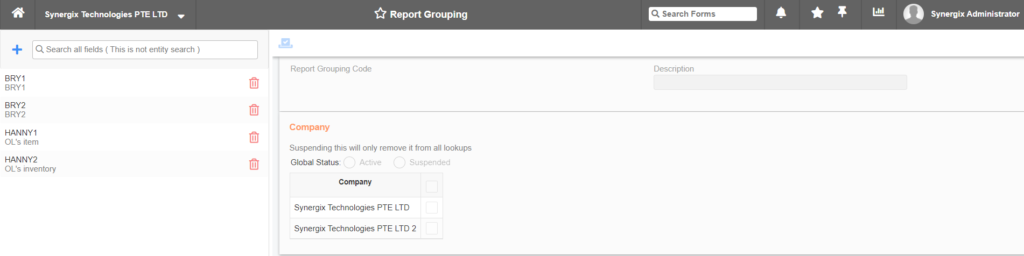
3. E2 Service Category & Report Grouping (FC: TH6_SERVICE_CATEGORY, TH6_REPORT_GROUPING)
In Synergix ERP system, we offer Global Service Category maintenance to let users to maintain the service category globally to all company branches. Hence, every branch will be provided the same list of service category. Accordingly, E2 Service Category & Reporting Grouping screens are now available in our system with UI enhancement. ERP software users are able to do service grouping and reporting while utilizing the same list of equivalent sources.
- To enable E2 Service Category screen, users can access to Master Setup > Service > Service Category.
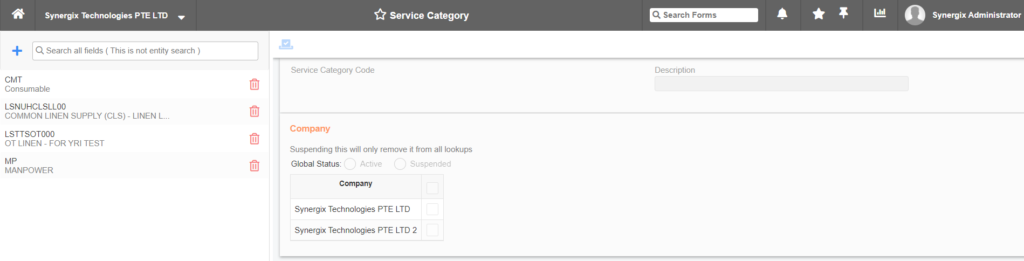
- And to reach E2 Report Group screen, kindly entry Master Setup > Service > Report Grouping.